

Software Tool Sprawl is an increasingly important challenge for businesses seeking to control software costs, improve productivity, and simplify enterprise technology management. As organisations adopt more digital applications, overlapping features and disconnected workflows can create complexity that undermines the benefits of new technology.
As organisations grow, different departments often select tools based on their immediate needs. Sales teams prioritise customer visibility, marketing teams need campaign analytics, finance teams require accurate reporting, and IT teams focus on security and system reliability. Without coordinated decision-making, these choices can create overlapping subscriptions, disconnected workflows, and fragmented business information.
The challenge is not simply the number of applications an organisation uses. It is whether those applications work together, deliver measurable value, and support the way employees actually perform their jobs. Understanding the hidden costs of software sprawl helps businesses make smarter technology investments, improve operational efficiency, and build a more manageable digital workplace. Understanding Software Tool Sprawl requires looking beyond subscription expenses. It affects how employees access information, how departments collaborate, how IT teams manage security, and how business leaders evaluate technology investments. Without a coordinated software management strategy, organisations may continue adding applications while overlooking inefficiencies already present in their technology stack.
1. Rising Software Costs and Unused Subscriptions
One of the most visible consequences of software tool sprawl is the gradual increase in recurring subscription expenses. A new application might cost only a small amount each month, making it easy for a department to justify the purchase. However, when multiple teams independently subscribe to similar services, these seemingly minor expenses can become a significant budget consideration.
For example, consider a business paying for 20 software subscriptions at ₹999 each per month. The total reaches ₹19,980 monthly, or ₹2,39,760 annually, before taxes, price changes, premium features, and additional usage charges. This calculation illustrates how quickly recurring costs accumulate, even without expensive enterprise contracts.
The issue is not that every subscription is wasteful. Some applications provide essential capabilities that justify their cost. Problems arise when businesses continue paying for unused licences, overlapping features, or tools that no longer align with their operational needs.
How businesses can reduce unnecessary software spending
A structured SaaS management process can help organisations understand where their money goes and whether each application still delivers value.
- Audit active subscriptions: Maintain a central inventory of applications, licence counts, renewal dates, and subscription costs.
- Identify overlapping features: Compare tools that support similar functions, such as task management, file sharing, reporting, and team communication.
- Remove unused licences: Review actual usage and adjust access when employees change roles or leave the organisation.
- Review renewals proactively: Evaluate the business value of each subscription before automatic renewal dates.
- Match plans to requirements: Determine whether teams need premium features or whether a lower-tier subscription meets their needs.
Effective Software Tool Sprawl management begins with visibility into existing software purchases, licence usage, and renewal commitments. By reviewing these factors together, businesses can identify redundant subscriptions, eliminate unnecessary spending, and make better decisions about future technology investments.
The objective is to make software spending more transparent. When organisations understand their existing commitments, they can direct budgets toward tools that support measurable business priorities.
2. Lost Productivity From Constant Application Switching
Software tool sprawl can create a productivity problem that is harder to measure than subscription costs. Employees may need to switch between several applications just to complete one routine task, especially when systems do not share information effectively.
Consider a sales representative preparing for a customer meeting. They may retrieve contact details from a CRM, review conversations in email, locate a proposal in cloud storage, check delivery updates in a project management platform, and consult a reporting dashboard for recent performance data. Each application serves a purpose, but the overall process becomes unnecessarily fragmented when information is scattered across systems.
Repeated context switching can interrupt concentration, increase the effort required to locate information, and make simple processes feel more complicated. Across a team, these interruptions may reduce the time available for customer engagement, problem-solving, and other valuable work. The productivity impact of Software Tool Sprawl becomes more noticeable when employees repeat these activities throughout the working day. Instead of completing tasks in a single workflow, they move between disconnected platforms, search for documents, and manually transfer information. Businesses can address this challenge by simplifying common workflows and ensuring that essential applications work together effectively.

Why disconnected workflows matter
The productivity impact is not limited to the time required to open another application. Employees may also need to remember different interfaces, repeat searches, transfer files, and verify whether information is current.
Businesses can address these challenges by:
- Mapping common workflows to identify unnecessary application changes.
- Integrating systems that regularly exchange business information.
- Establishing a clear location for frequently used documents and records.
- Reducing duplicate notifications and unnecessary manual updates.
- Evaluating new applications according to how they improve complete workflows, not just individual features.
A tool should make a business process easier from beginning to end. If it introduces more steps than it removes, its overall value deserves a closer review.
3. Fragmented Data and Inconsistent Business Reporting
When departments operate separate applications without clear data ownership, businesses can struggle to maintain a reliable view of their operations. Customer details, sales opportunities, project updates, invoices, and campaign results may be recorded in different systems, sometimes with conflicting information.
For example, a sales team might update a customer’s requirements in its CRM, while the delivery team maintains an older version in a project management tool. Finance may use a separate record for billing. If these systems are not synchronised and employees do not follow consistent update procedures, each department may make decisions using different information.
This creates more work for employees who must export data, reconcile spreadsheets, investigate discrepancies, and prepare reports manually. It can also make it harder for managers to understand business performance because the information needed for a complete picture is distributed across multiple platforms.
Software Tool Sprawl can make data management more difficult because each application may maintain its own records, reporting structure, and update process. Without consistent data governance, teams can struggle to identify the most accurate information. Establishing clear ownership and reliable integrations helps organisations maintain consistency across departments.
Establishing a reliable source of truth
Reducing data fragmentation requires more than purchasing an integration tool. Organisations also need clear rules governing how information is created, updated, and maintained.
- Assign data ownership: Define which system is authoritative for customer records, financial transactions, project status, and other important information.
- Standardise data entry: Use consistent formats, required fields, and validation rules across relevant applications.
- Automate appropriate data transfers: Connect systems where information needs to move regularly and reliably.
- Monitor data quality: Review duplicates, outdated records, missing fields, and conflicting values.
- Clarify reporting definitions: Ensure teams use consistent meanings for key business metrics.
With stronger data governance, companies can spend less time reconciling information and more time using it to make informed decisions.
4. Security Risks and Shadow IT
Every new application introduces additional questions about access permissions, data storage, vendor reliability, and the handling of sensitive business information. As the software environment expands, maintaining visibility over these responsibilities becomes more demanding.
The risk increases when employees purchase or adopt applications without involving IT, procurement, or security teams. This practice is commonly known as shadow IT. It can emerge when workers seek faster ways to complete tasks, especially if approved tools are difficult to use or do not address their needs.
For instance, an employee might upload a customer document to an unapproved AI service to generate a summary. Although the intention may be to save time, the action could expose confidential information to a service that has not been evaluated for business use.
An expanding application portfolio can also make it harder to track user accounts, remove access after role changes, and understand which vendors process organisational data.
Another important consideration in Software Tool Sprawl is maintaining consistent security across business applications. A centralised software inventory, clear approval procedures, and regular access reviews help IT teams identify unapproved services and manage risks associated with disconnected systems. Managing Software Tool Sprawl requires organisations to understand which applications employees use, what information those applications process, and who has permission to access that information. Greater visibility helps IT teams assess vendors, strengthen access controls, and establish practical policies for approved business software.
Practical steps to improve software security
Businesses should make security and governance part of the application selection process rather than treating them as follow-up activities.
- Maintain an inventory of approved and actively used software.
- Evaluate vendor security, data handling, and contractual requirements before adoption.
- Apply role-based access controls and least-privilege permissions.
- Remove accounts and permissions that are no longer required.
- Establish clear guidelines for using AI tools with company information.
- Give employees practical, approved alternatives for legitimate business needs.
The goal is to encourage responsible technology adoption while reducing the risks associated with applications operating outside established controls.
5. Higher Training, Onboarding, and Support Costs
Every additional platform introduces some level of learning and administration. Employees need to understand how the software works, where information belongs, how permissions are managed, and which features support their responsibilities. IT teams may also need to handle access requests, troubleshooting, vendor communication, and recurring training.
When applications accumulate without a clear adoption strategy, employees may use only a small portion of their available features. Some may continue relying on spreadsheets because the approved platform feels unfamiliar, while others develop workarounds that make reporting inconsistent.
This can create a cycle in which businesses purchase more software to solve problems that better training, clearer processes, or improved configuration could have addressed.
Improve adoption before introducing another tool
Before approving a new platform, business leaders should determine whether the existing technology can meet the requirement with appropriate configuration or training.
A practical approach includes:
- Assessing whether employees understand and use the current platform effectively.
- Providing role-specific training instead of generic feature demonstrations.
- Documenting standard workflows and explaining where information should be stored.
- Collecting feedback about recurring usability problems.
- Measuring adoption through meaningful outcomes rather than account creation alone.
A smaller collection of well-supported applications can deliver more value than a larger collection that employees struggle to use consistently.
6. Integration Complexity and Growing IT Maintenance
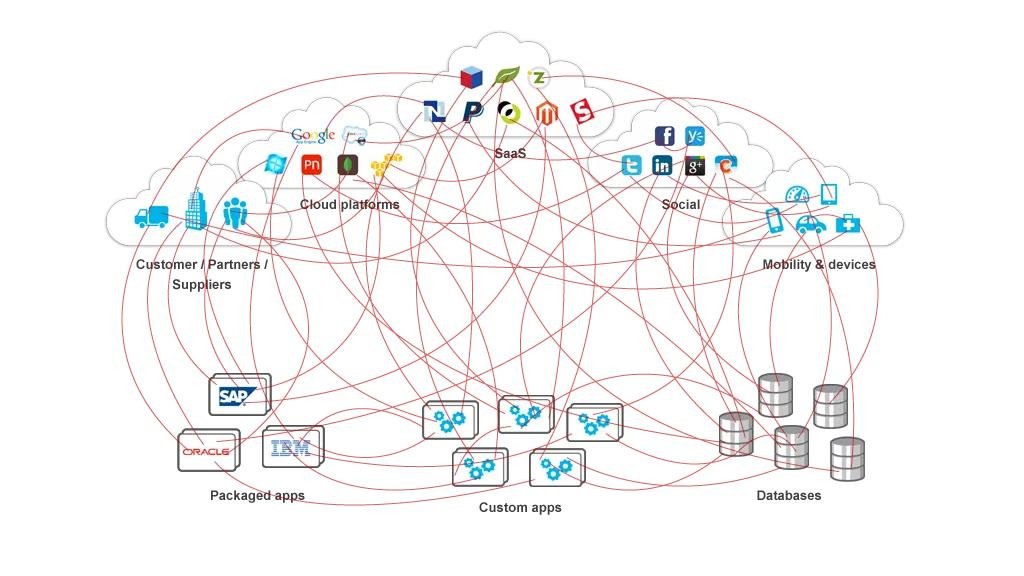
Software applications rarely operate in complete isolation. Businesses often need their systems to exchange customer records, financial information, project updates, documents, and reporting data. As more applications enter the technology stack, the number of potential connections and dependencies can increase.
Each integration may require configuration, testing, monitoring, and maintenance. Changes to one platform can affect another, particularly when workflows depend on application programming interfaces (APIs), automated data transfers, or custom integrations. If these connections are poorly documented, troubleshooting becomes more difficult when something stops working.
For example, an automated process that transfers customer information from a CRM to a billing system may depend on specific fields, permissions, and data formats. If a software update changes one of those requirements, the process may fail and require manual intervention.
Managing integration complexity
Businesses should evaluate how each application affects the wider technology environment before adding it to the stack.
- Document critical integrations, their owners, and the processes they support.
- Identify fragile workflows that depend on manual transfers or custom connections.
- Monitor integration failures and establish clear troubleshooting procedures.
- Prefer supported integration methods over unnecessary custom development.
- Assess the maintenance implications of adding another system.
- Consider whether existing platforms can support the requirement without introducing another dependency.
Integration should make business processes more reliable, not create an additional layer of complexity that is difficult to maintain.
7. Reduced Visibility Into Technology Value
The final hidden cost of software tool sprawl is the difficulty of determining whether technology investments are actually delivering business value. When applications are purchased independently, organisations may lack a consistent way to compare their costs, usage, benefits, and operational impact.
A department might consider a tool successful because employees have adopted it, while finance focuses on subscription costs and IT evaluates its maintenance and security requirements. These perspectives are all relevant, but they do not necessarily establish whether the application improves the business process it was intended to support.
For example, a reporting platform may provide sophisticated dashboards, yet still require employees to export data from several other systems before the dashboards can be updated. Its features may be useful, but the full process could remain inefficient.
Measure outcomes, not just software usage
A structured review helps businesses distinguish applications that create genuine value from those that simply add another layer to daily operations.
Useful evaluation criteria include:
- Business impact: Does the application improve a defined process or support an important operational requirement?
- Total cost: What are the subscription, implementation, integration, support, and administration expenses?
- Employee adoption: Are the intended users actively using the features that matter?
- Process efficiency: Does the tool reduce manual work, delays, or repeated data entry?
- Risk and compliance: Does the application meet the organisation’s security and governance requirements?
- Strategic fit: Does the tool support current business priorities and integrate appropriately with the existing environment?
These criteria provide a stronger basis for software decisions than feature comparisons alone. They also help organisations explain why a tool should be retained, consolidated, renegotiated, or retired.
How to Reduce Software Tool Sprawl Without Disrupting Operations
Reducing software tool sprawl does not mean removing every application that overlaps with another. Different teams may have legitimate specialist requirements, and forcing every process into a single platform can create operational limitations of its own.
The better approach is to build a technology environment in which every application has a defined purpose, an accountable owner, and a clear relationship with the wider business.
Step 1: Build a complete software inventory
List the applications used across departments, including centrally approved tools and applications purchased directly by individual teams. Record the subscription costs, licence counts, business purpose, owners, renewal dates, integrations, and data types handled by each application.
This inventory establishes a baseline for future decisions and helps reveal subscriptions or applications that may have been overlooked.
Step 2: Evaluate actual usage and feature overlap
Compare the original reason for purchasing each tool with how it is used today. Identify inactive licences, underused features, duplicate capabilities, and workflows that rely on multiple platforms to accomplish similar tasks.
Avoid assuming that applications are redundant merely because their feature lists overlap. Their importance depends on how they support real business requirements.
Step 3: Prioritise opportunities by business impact
Rank potential improvements according to expected financial savings, employee productivity, data quality, security, implementation effort, and operational risk.
Start with relatively straightforward improvements, such as removing unused licences or simplifying an unnecessarily complex workflow. More substantial consolidation projects may require additional testing and change management.
Step 4: Strengthen integration and governance
Define which applications are authoritative for key business information, establish consistent access controls, and improve the reliability of essential integrations.
Assign clear ownership for application approvals, data management, vendor reviews, and renewal decisions. This reduces the likelihood of fragmented purchasing decisions reappearing after the initial cleanup.
Step 5: Establish recurring software reviews
Software management should be an ongoing business practice rather than a one-time cost-cutting exercise. New tools will emerge, teams will change, and business priorities will evolve.
Schedule regular reviews to examine usage, costs, renewals, security, employee feedback, and the value delivered by existing applications. Involve IT, finance, procurement, and business stakeholders so that decisions account for both technical requirements and operational realities.
Building a More Efficient Enterprise Technology Stack
A well-managed technology stack balances capability with simplicity. Businesses need applications that support collaboration, customer management, analytics, finance, security, and other essential functions. However, adding another platform should be a considered decision based on a genuine requirement rather than a default response to every operational challenge.
Technology leaders can improve this balance by connecting software decisions to broader business objectives. Instead of asking only which application offers the most features, they should consider how it fits into existing workflows, what information it needs, who will maintain it, and how its contribution will be evaluated.
An effective strategy also recognises that consolidation is not always the best answer. Some applications should remain separate because they provide specialist functionality or satisfy important business requirements. In those cases, reliable integration, clear governance, and well-defined ownership may deliver better outcomes than replacing several systems with one.
The long-term objective is to create a technology environment that employees can use confidently, IT teams can manage effectively, and business leaders can evaluate transparently. With a disciplined approach to software selection and ongoing management, organisations can reduce avoidable complexity without sacrificing the capabilities that help them compete.
Conclusion
Software Tool Sprawl can quietly increase operating expenses, reduce employee productivity, fragment business information, and introduce unnecessary security and maintenance challenges. While individual applications may appear affordable and useful, their combined impact can become difficult to manage when businesses fail to review how their technology investments work together.
The solution is not to eliminate software indiscriminately. It is to make more deliberate decisions about which applications the business needs, how they integrate, and whether they continue to deliver meaningful value. Regular software audits, stronger data governance, employee training, licence optimisation, and clear application ownership can help organisations control costs while improving operational efficiency.
Ultimately, controlling Software Tool Sprawl helps organisations build a more efficient, secure, and cost-effective technology environment. By reviewing subscriptions regularly, improving integration, and selecting applications according to business needs, companies can reduce unnecessary complexity while preserving the tools that deliver genuine value.
Frequently Asked Questions
1. What is Software Tool Sprawl?
Software Tool Sprawl occurs when an organisation accumulates too many software applications without sufficient coordination, oversight, or evaluation of their overall value. It can lead to overlapping functionality, rising subscription costs, fragmented data, and complicated workflows.
2. What causes software sprawl in businesses?
Common causes include independent software purchases by departments, rapid adoption of new technologies, unclear procurement policies, limited visibility into existing subscriptions, and the introduction of new tools without reviewing current capabilities.
3. How does software sprawl affect business productivity?
Employees may spend additional time switching between applications, searching for information, transferring data manually, and reconciling conflicting records. These activities can interrupt workflows and leave less time for customer service, analysis, and strategic work.
4. How can companies identify redundant software subscriptions?
Businesses can create a central software inventory, review subscription costs and actual usage, compare overlapping features, consult employees, and examine renewal dates. They should distinguish genuinely redundant applications from specialist tools that serve important operational needs.
5. What is the difference between software sprawl and shadow IT?
Software sprawl refers to the accumulation of applications across an organisation, often resulting in duplication and complexity. Shadow IT refers to software, services, or technology used without the appropriate visibility or approval of the organisation’s IT function. The two can overlap, but they describe different problems.
6. Can software sprawl create cybersecurity risks?
Yes. A larger application environment can make it harder to manage user permissions, track vendors, monitor data handling, and remove access when employees leave. Unapproved applications may also introduce additional risks when sensitive business information is shared without appropriate review.
7. Should businesses consolidate all their software into one platform?
No. A single platform may not meet every department’s requirements. Businesses should consolidate applications when doing so provides a clear benefit, but retain specialist systems where they deliver essential functionality. Effective integration and governance may be preferable to complete consolidation.
8. How often should a company conduct a software audit?
A practical starting point is to conduct a comprehensive review annually, with more frequent checks of subscription renewals, licence usage, access permissions, and critical applications. The appropriate schedule depends on the organisation’s size, regulatory requirements, rate of technology adoption, and operational risks.
9. How can businesses measure the ROI of their software investments?
Organisations can evaluate total ownership costs alongside measurable outcomes such as reduced manual work, improved process completion times, stronger data accuracy, employee adoption, and better operational visibility. They should compare these outcomes with the original business objectives rather than relying on feature availability or login counts alone.
10. What is the first step toward reducing software tool sprawl?
Start by creating a central inventory of applications, subscriptions, costs, owners, and usage. This provides visibility into the existing technology environment and helps identify the most valuable opportunities for cost optimisation, workflow improvement, and stronger governance.